As someone who reads and writes a fair amount online, I’m always looking to optimize my information flows. Particularly getting articles from one service to another can be tricky.
I found a set of tools and workflows that I’m quite happy with for the time being, so I thought I’d share them.
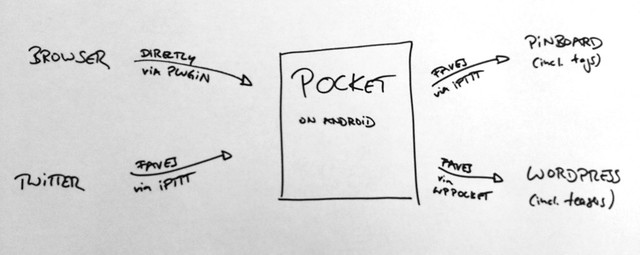
Feedback, tipps for improvements etc are always welcome!
Input
I like to read primarily on Pocket, particularly Pocket for Android on my Nexus tablet. So that’s where I want my “to read” items to go.
From my browser, I send articles via the Chrome plugin that sends the links directly. Sometimes I tag them, sometimes I don’t, so far that hasn’t been super important for me.
To get links into Pocket from Twitter, I use this IFTTT recipe that sends the content linked from my Twitter faves and sends it over. In other words, I can fave a tweet, and the article linked in that tweet gets sent over straight away. Extremely comfortable particularly when skimming Twitter on the phone.
Pocket offers plugins for all major browsers and platforms.
Throughput
When reading in Pocket – mostly on the tablet, even though the mobile and Mac apps are also pretty decent – I can get through a lot of info in relatively little time. If I want to save something for later, I add some tags within Pocket and fave the article there. This triggers two processes…
Output
One, this IFTTT script takes faved articles and bookmarks them for me on Pinboard, including tags, so I have the post archived for future reference.
Two, the WordPress plugin WP Pocket WP Stacker lets me auto-generate drafts of link lists based on my Pocket faves. With some minimum editing I can get to the reading lists you’ve encountered on my blog.
Once these steps are set up, it’s very convenient and allows me to get through lots of material with a bare minimum of friction. Of course, you’ll want to adapt and tweak to match the tools your personal workflows. But thanks to more and more useful APIs and an ever-growing library of IFTTT recipes, it’s easier than ever to plug these services into one another.
Enjoy!